

Trading Camarilla Pivots - Camarilla Equation in Forex
Forex Camarilla Equation Levels
The Camarilla Equation in Forex calculates eight levels of intra-day support and resistance according to yesterday's High, Low, Open and Close. There are 5 of these "L" levels below yesterday's close, and 5 "H" levels above. They are numbered L1, L2, L3, L4 and L5 etc.
The most important levels are L3, H3 levels and L4, H4 levels.
The main way to use Camarilla equation in Forex is to wait for price to approach L3. When price does so, traders expect market to reverse at L3 and H3 level and so they open positions against a trend and place protective stop loss outside closest L4 or H4 level.
Stop level at L4/H4 is only a suggested stop, you'll learn why below, traders are encouraged to find their own stops according to the money management rules and risk appetite.
Should one immediately place an order once price hits L3/H3 level? Yes, if you trade aggressively, No, if you like to see confirmation first. For confirmation price have to hit L3/H3 level, find support or resistance there and clearly demonstrate an intention to reverse. Traders may want to learn about reversal candlestick formation patterns in order to be able to spot a confirmation of a turning market.
The second way to trade Forex with the Camarilla Equation is to look at L4/H4 levels to be breached, which would signal of a breakout trade setup and allowing traders trade breakout in the direction of a trend. For, example, if price pushes up through the higher L4/H4 level, the chances are it is going to keep on running that way. Breakout trading outside L4/H4 level expects to capture sharp directional market moves.
While running with the breakout outside L4/H4, use either suggested L5/H5 level or your own target.
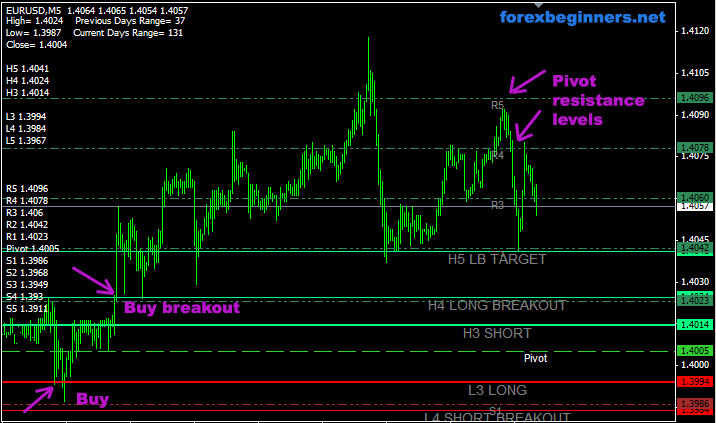
Trading Forex with the Camarilla Equation
After setting Camarilla levels on the charts, traders look at where the market has opened regarding the levels.
Market Open INSIDE L3/H3
If the market opens inside the L3/H3 levels, you must wait for price to approach either of these two levels. Whichever it hits first determines a trade: if the higher H3 is hit, Short against the trend in the
expectation that the market is going to reverse. Initial S/L above H4.
The opposite, applies when the Lower L3 level is hit first - go Long against the trend. Set S/L below L4.
Market Open OUTSIDE L3/H3
In this case, you wait for the market to retreat back through the L3/H3 level - you will then be trading with the trend, and once again, the L4/H4 levels act as you Stop loss.
Taking profits is a matter of personal judgment - just be aware that you
WILL want to take profits at some time during the day, because the market is unlikely to "behave" and stay right-sided for your trade. These reversals from L3/H3 appear to happen as often as 4 times out of 5 during intra-day trading.
Camarilla combined with Pivot Points
On the sreenshot above you may have also noticed a white Pivot line and the beauty of price reversal at it. You may use both Camarilla levels and Pivot levels to achieve better trading results.
You can download Camarilla indicator for MT4 platform below.
It has built in Pivot point levels and plus Fibonacci levels.

Hello,
Can some one tell me where I can find the download for the camarilla pivot for mt4 thanks.
Regards...
JP
you can download it here:
http://forex-indicators.net/mt4-indicators/camarilla
Thanks guys/gals @ Forex for Beginners !!
Regards...
JP
Hello again,
JP here I am new to fx trading but I have caught on fairly well been at it for about two months.I mainly trade 1min charts and use two different platforms mt4 and OANDA I am using (20)ema (30)ema on one chart with stochastics 8,3,3 and the other chart just 17,21sma with the same stockhastic I seem to do well with this setup I just wait for my indicators to all point in the right direction enter then exit usually with profit 6-10 pips but my question is about support and resistance how can I intergrate this indicator into my current method thanks again for your help.
Regards...
JP
Hello FfB,
I just downloaded tha camarilla file it is in the experts folder and in the navigator sidebar but it will not run on my chart I click on expert advisors then click on camarilladt then click on add to chart go up top click on expert adv on the top bar but no camarilla should the icon in the navigator turn grey when the camarilla is added to the chart I think it should please advise if you could thankyou.
Regards...
JP
Hi JP,
It is a MT4 custom indicator, not an expert advisor.
Anyway, you should place it into /experts/indicators folder.
Then restart the platform.
Go to menu: Insert > Indicators > Custom > camarilladt
It should appear on your chart.
Regards,
Forex Tutor
Hello FfB,
JP here should the camarilla only be visible on my 1hr chart and not my 1min??
JP
Hello FfB,
JP here I got my 1min 1hr problem sorted out so no need to respond to my last inquiery thanks again for all your help !!!
Regards...
JP
i consider camarilla pivot points quite reliable. my question is this, what timeframe do you consider best for me {intraday trader}?
30 min charts to see the short term trends, 5 min charts for trading (entries and exits).
hi,i need your help to find the software camarilla trading pivots to enable comparison of various stocksof my choice and not predetermined stocks.kindly revert.
Hi there, I trade 1M charts and I use the camarilla indicator herein with the fibs turned to false; I use 'float' for the fibs (see any forum for 'float') plus Trend+Line+Break. I'm going to give your Stochastic a try as I use my own chewed up and re-formed MACD crosses. I also incorporate a hidden stops EA just as a safeguard with the stop set to 4 and the TP to whatever I want.
Hi please i have not been able to download camarilla pivot from the link you gave above can you render further help.I trade with FXopen platform.Thanks in anticipation Ema.
Try this one:
camarilladt.zip
Hi,
My question is how to determine the market sessions using camarilla methodology in forex trading. In US equity trading, there is a clear "market hours" so the high, low and close inputs can be clearly determined for camarilla levels to be calculated. However, since forex markets are almost around the hours and the most active tradings occur when US equity markets are closed. I just wonder how this unique feature is adapted in forex trading. I highly appreciate it if you could share your experience!
Many thanks!
C.L.
hi,,,now i use camarilla for pending order,,,,every day o got lose,,,,,can't u help me,,,,,what suitable position need to enter,,and pls explain detail how to use camarilla,,,,,hope u alll help me because i lose very much
thk,,,,dikky
Forex is a 24 hour market, but despite this fact it has distinctive trading sessions: London session, New York, Asia, Australia, during which the market can be either active or slow.
As a rule, traders focus on early morning hours of London and New York sessions:
London - 3:00 am - 12:00 noon EST, followed by New York - 8:00 am to 5:00 pm EST.
Duing those hours we want to observe first Camarilla signals.
Hello dikki, You can short at H3 take profit 10 pips,stop loss H4. and you can Long at L3 take profit 10pips. Stop loss at L4. It's very powerful and profitable. Thanks
Hi, Can anyone or the site editors please add the formula to calculate the pivot levels manually? Esp. L/H 3 and 4.
The formula used in the calculation of Camarilla Pivot Points are:
R4 = C + RANGE * 1.1/2
R3 = C + RANGE * 1.1/4
R2 = C + RANGE * 1.1/6
R1 = C + RANGE * 1.1/12
PP = (HIGH + LOW + CLOSE) / 3
S1 = C - RANGE * 1.1/12
S2 = C - RANGE * 1.1/6
S3 = C - RANGE * 1.1/4
S4 = C - RANGE * 1.1/2
R1..R4 - Resistance levels
S1..S4 - Support levels
PP - Pivot point
RANGE - trading rage used for calculation on a given time frame (RANGE = HIGH - LOW). E.g. if we take a Daily time frame. Range = Daily High - Daily low
Camarilla + Pivot is A Great Combination For Profit, if u know how to use it with Support and Resistence levels ,,, Good luck alllll
Anyone currently using this camarilla technique. I want to use it during the Asian session. The new day starts at 5pm EST, I open a new session of the platform after that so it calculates the current previous days open, close, high and low. My trading hours are 6 to 11 pm EST but especially between 8 to 10 pm est when JPY session starts. I start with 15' candle chart to see where the currency has been moving and when I get close to L3 or H3 I switch to 5' candle chart for enter and exit. If price went above H3 I watch for reversal candle patterns to go short and current 5' sup/res levels showing lower lows and lower highs. When it looks good I will get short before H3 or wait until price crosses H3. I scalp for 25 pips but will get out early if candles show consolidation or reversal. Trade G/J, G/U, E/J, E/U, A/J & A/U. Stop loss is the fractal high on the 5' when it starts reversing short. Let me know what you think because I just learned about camarilla pivots tonight and installed them on my MT4 charts. They look great to know which direction to wait to trade. Don from Utah
now i know about important of camarilla pivot points
Hello Tutors and my fellow traders,
Im fairly new to forex and have found your post most educating. I have been told by some senior traders that the most important thing in forex is money management and trade accuracy. They have told me that having an accuracy of 70-80% with good money management is the best way to ensure one doesnt burn himself in this ruthless market.
Im curious to know the accuracy rate of this system. I am truly amazed by the systems signals and boundaries. I would like to incorporate this in my trading.
Hope to hear from you soon.
Rgds,
Buu
I've downloaded the camarilladt but there are a lot of lines on my chart and I don't like it. The lines even prevent me from seeing when the price gets to the breakout points especially Fib 6 to 16.
I've tried to remove them from objects list but that isn't possible (i'm no computer expert!)
How do I edit the code in order to get them out.
Thanks for the good work folks!
John Victor
Nigeria
hai iam vijay How to create Expert Advisor for camarilladt indicator........plz help me.
Camarilla with pivots and marking 00 and 50 levels should enable you to achive a daily 20 to 30 pips on 1 currency pair.
I use this on mt4 daily on 11 pairs on smart live spreads the only (as far as i know)operating on UK time.
I then spread bet with stops just above l4/h4 levels but don't get too greedy.
Also try and compound your balance and it should double every 40 days.
I use 2/3 % on any one trade.
Camarilla's are the best thing i've ever come across.Thanks Michael
Hi, I'm using FXDD Malta MT4, but not able to load Camarilla setting in customs. Plz suggest.
This is really good.
But i wanted to know what does C means in the equation. is it pivot point or previous close?
hello,
I appreciate the work dont here for camarilla points.
I have downloaded, and put it up on daily time frame, which shows me the correct levels. But to trade this i need to lower my time frame, and when i do that say i am on M5 or M15, camarillapoints changes accordingly.
Can you help me out, how can we get the Camarilla points of daily levels on lower time frames?
thanks
Hi Michael
Would you mind expanding a little more on your trading approach please? Also when you say 00 and 50 levels do you mean fib levels here? Looks like you've got something that really works for you. Consistent 20-30 pips daily is really good.
Joey
i like this indikator...
There is another way to calculate this Camarilla levels.
Pivot plus 21 pips to open buy position
And pivot - 21 pips for sell position.
Both targets 20 pips profit. Working quite good for euro and cable.
I also tried the camarillaadt.zip to no avail. I use ninja trader 7 platform and both files were rejected. Aything compatible to Ninja Trader 7
I prefer use Pivot then camarila
if you know how to use it will make u profit..Reza
Don't understand how to get the file into MT4. I see the Camarilla file that I downloaded. In MT4, I see the Navigator that shows indicators. Should I try to get Camarilla into the indicators? There is also a file called Expert.mqt in the Templates file. Please help.
Thanks